A live GoHighLevel sales dashboard for the office TV.
HighLevel's dashboards are built for reviewing numbers at a desk. GoalHorn puts your won opportunities on the office TV as they happen: a workflow adds a row to a Google Sheet when a deal is marked won, and the board re-ranks your reps, moves the goal and celebrates the win within 30 seconds.
No Zapier, no code, about ten minutes to set up.
Free for up to 5 reps. No account, nothing to install.
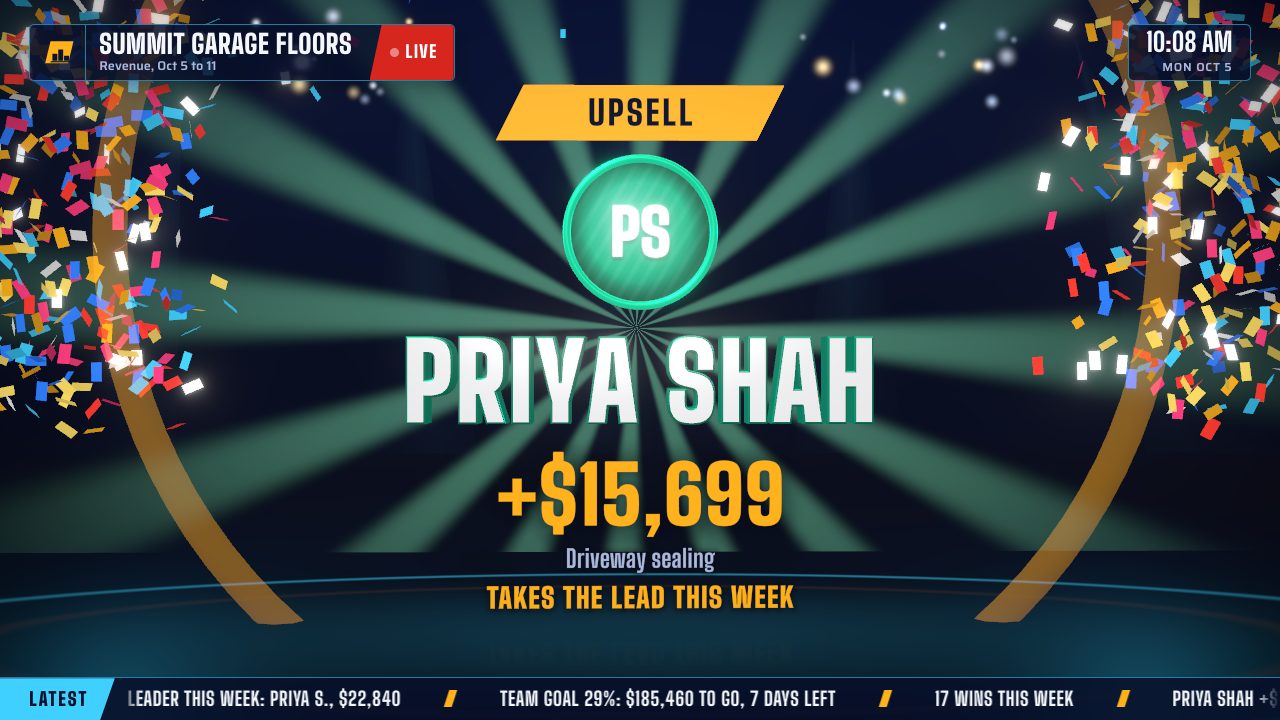
A sample team. In your account, every win is a row a HighLevel workflow added. Drawn live in your browser, no video.
What HighLevel's dashboard does, and what the floor needs.
Keep HighLevel for reporting. Give the sales floor a screen that plays the score.
Custom dashboards
Every sub-account can build dashboards from widgets (scorecards, time series, bar and pie charts, tables) on contacts, opportunities, appointments, calls and revenue, and email them as reports.
Made for a desk
They are read on a laptop by someone who is logged in. On the office TV they are a page of charts: nothing ranks the reps live or tells the room a deal just closed.
What GoalHorn adds
A leaderboard race by rep, the team goal with pace, the latest wins, and a full-screen celebration with the rep's name, the amount and the gong every time an opportunity is won.
Set it up in about ten minutes.
One workflow in HighLevel, one sheet in Google, one link on the TV.
Need the sheet? Start from the free wins log template.
Make the sheet
A Google Sheet with Timestamp, Rep, Amount and Deal in row 1, and Type if you want the pipeline or stage on each win.
Connect Google to the sub-account
HighLevel's Google Sheets action needs a Google account connected to the sub-account, with access to that sheet.
Create the workflow
Automation, Workflows, Create Workflow, Start from scratch. Add the Opportunity Status Changed trigger with the filter Status is Won, plus a pipeline filter if only one pipeline counts.
Add the row
Add the Google Sheets action and choose Create Spreadsheet Row. Pick the Google account, drive, spreadsheet and worksheet, then map the columns as in the table below.
Publish and test
Save, publish, and mark a test opportunity as won. The row should appear in the sheet within moments.
Point GoalHorn at the sheet
Share the sheet as Anyone with the link can view. In GoalHorn choose Live sheet (any CRM), paste the link into CSV link and press Test the link. Then open the TV link on the office screen.
Map the columns.
In the Create Spreadsheet Row action, type / in a field or open the menu to insert each value.
| Column | What to insert | Example |
|---|---|---|
| Timestamp | {{right_now.middle_endian_date}} {{right_now.hour}}:{{right_now.minute}}, the date and time | 10/5/2026 14:31 |
| Rep | The assigned user's name, {{user.name}} | Maya Rios |
| Amount | The opportunity's value, from the Opportunity section of the menu | 4250 |
| Deal | The opportunity's name | Smith garage floor |
| Type | Optional: the pipeline or stage name | Install sold |
Set the board's time zone to the HighLevel location's: both read the time as local. If you map only the date, GoalHorn still celebrates each row as today's win, but the latest wins list cannot put that day's wins in order. Reps are matched by name, so add the same spelling on GoalHorn's Reps page for photos and goals. {{user.name}} is the contact's assigned user, which is the closer in most accounts; if yours assigns opportunities and contacts to different people, insert the opportunity's owner from the menu instead.
What it costs.
Usually a few dollars a month on the HighLevel side, and nothing for Zapier.
HighLevel
Google Sheets is a premium workflow action. Eligible sub-accounts get 100 free executions, then HighLevel's premium price per execution applies (about a cent a row), unless the sub-account has a Workflow Pro plan.
Zapier
Not needed. The workflow writes to the sheet itself, so there are no tasks to pay for and no extra delay.
GoalHorn
Free for up to 5 reps. $49 a month flat for the whole team, and $149 for up to three boards, such as closers, setters and a second office.
More boards from the same account.
Any HighLevel trigger that fires at a moment worth cheering can add a row the same way.
Setters
A trigger on booked appointments writes one row per appointment, with 1 as the amount. Setters race on appointments set on their own board.
Collections
A trigger on payments received writes the amount collected, for teams that celebrate cash in the bank rather than signed deals.
Agencies
Run HighLevel for clients? Each sub-account's workflow fills its own sheet, and each sheet drives its own board and TV link, on the client's own GoalHorn plan.
One flat price for the whole team.
Not per rep and not per screen. Monthly, cancel any time.
Free
One board for up to 5 reps, with the podium, race and goal scenes and a celebration for every win.
Team, $49 a month
Every rep on the board, every scene including the Replay, every look and sound, and no GoalHorn mark.
Floor, $149 a month
Up to three boards for different teams or offices, your own celebration sound, and rotating between two numbers.
Want to run it with your own team first? Ask for a 14-day trial key.
GoHighLevel questions.
Does GoalHorn connect to GoHighLevel directly?
Through a Google Sheet that a HighLevel workflow fills, with no Zapier and no code. GoalHorn has no server, so it never holds a HighLevel login or API key.
Which HighLevel trigger should I use?
Opportunity Status Changed with the filter Status is Won, for closed deals. For a setters' board, use a trigger that fires when an appointment is booked, and write a row the same way.
Is the Google Sheets action free in HighLevel?
It is a premium workflow action. Eligible sub-accounts get 100 free executions, then HighLevel's standard premium pricing applies unless the sub-account has a Workflow Pro plan.
How fast does a won deal show on the TV?
The workflow writes the row moments after the status changes, and GoalHorn reads the sheet every 30 seconds, so the celebration usually plays within a minute.
Can I put the GoHighLevel dashboard itself on a TV?
You can open it in a logged-in browser on the TV. It shows the charts as they are; it does not rank the reps live or celebrate wins, which is the job GoalHorn does next to it.
Does this work for agencies with many sub-accounts?
Yes, with each client on its own GoalHorn plan, since a plan covers boards inside one company. Each sub-account's workflow writes to its own sheet, and each sheet drives its own board. Ask about agency pricing by email.
HighLevel details are from help.gohighlevel.com (custom dashboards, the Google Sheets premium workflow action and the merge field list), checked October 4, 2026. HighLevel and GoHighLevel are trademarks of their owner, and Levology Labs is not affiliated with it.
Your next won deal, on the big screen.
Free for up to five reps. $49 a month flat when the whole team is on it.
Want Team or Floor features first? Ask for a 14-day trial key.