Free car sales tracker template for Excel and Google Sheets.
A deal log for every delivery, and a leaderboard that ranks your salespeople by units, with new and used, gross, goal and pace for the month. Use it as a spreadsheet, or point GoalHorn at the same sheet and it becomes a live board on the showroom TV, with a bell for every delivery.
Free, no sign-up. Opens in Excel and Google Sheets.
Download the tracker.
A sample month for Lakeview Motors, a made-up store with five salespeople. Replace the sample rows with your own deliveries and the leaderboard follows.
Excel workbook (.xlsx)
A Deal log tab, a Leaderboard tab with units, new, used, gross, average gross, goal, percent of goal and pace for each salesperson and the store, and a Read me tab. It also opens in Google Sheets; the data bars show in Excel.
Deal log only (.csv)
Delivery Date, Salesperson, Stock Number, New/Used, Vehicle and Gross, one row per delivery. Import it into a blank Google Sheet to start a log from scratch, and add a Units column for split deals.
What's in the tracker.
Three tabs and plain formulas you can read and change, with no macros.
Deal log
One row per salesperson per deal: the delivery date, salesperson, stock number, New, Used or CPO, the vehicle, units and gross. It's the only tab anyone types into, and the tab GoalHorn reads for the TV.
Leaderboard
Each salesperson's units for the month, split into new and used, with gross, average gross, their unit goal, percent of goal, pace and rank. Bars compare the units, a second bar fills toward each goal, and a Store line counts the whole month.
Read me
The rules on one page, from split deals to starting a new month, and the steps to put the deal log on a TV.
The deal log, column by column.
Seven columns in this order. The leaderboard reads them by position, and GoalHorn reads them by name.
| Column | What goes in it | Example |
|---|---|---|
| Delivery Date | The day the car was delivered. A date on its own is enough. | 2026-10-12 |
| Salesperson | Spelled the same way every time, so the totals add up. | Dana Cruz |
| Stock Number | Keeps each row's identity, so a corrected row isn't celebrated twice on the TV. | U1220 |
| New/Used | New, Used or CPO, from a drop-down. Used counts everything that isn't New. | CPO |
| Vehicle | Year and model. It can show on the TV, so leave the customer's name out. | 2023 midsize sedan |
| Units | 1 for a car, 0.5 for each salesperson on a split deal. | 0.5 |
| Gross | Front, back or total, whichever your pay plan counts. One number per row. | $2,180 |
How the tracker counts.
The same rules most desks keep on the whiteboard, written into the formulas.
A split deal is two rows
Each salesperson gets a row with 0.5 in Units and their share of the gross. Two halves make a unit, so the store total stays right.
Used is everything that isn't New
CPO included, so New and Used always add up to Units, whatever labels your store uses.
Pace, or tracking
Units, divided by the days from the 1st through the latest delivery that month, times the days in the month. Green when a salesperson is on track for their goal, red when they're behind. To pick the goals, or to work the pace out in selling days, see car sales goals and the pace calculator.
Ties go to the higher gross
Two salespeople on four units rank by gross, so the tie goes to the more profitable month.
Any month in one cell
Type the 1st of a month into Month and the leaderboard shows that month. The log keeps every month, so last October is one cell away.
The Store line
It counts every delivery that month, even from a salesperson who isn't listed. Its goal adds up the salespeople's goals until you type the store's own objective.
Track car sales in Google Sheets.
Starting from a blank sheet? Three formulas do most of the work. They assume a tab named Deal log with the seven columns above, in columns A to G.
Need the formulas for a general sales team instead? See the sales leaderboard template.
Rank the salespeople
On a second tab, QUERY totals this month's units and gross for each salesperson and sorts them, with ties going to the higher gross.
=QUERY('Deal log'!A1:G, "select B, sum(F), sum(G) where B is not null and toDate(A) >= date '"&TEXT(EOMONTH(TODAY(),-1)+1,"yyyy-mm-dd")&"' group by B order by sum(F) desc, sum(G) desc label B 'Salesperson', sum(F) 'Units', sum(G) 'Gross'", 1)Split new from used
The same month, one column per label: CPO, New and Used beside each name.
=QUERY('Deal log'!A1:G, "select B, sum(F) where B is not null and toDate(A) >= date '"&TEXT(EOMONTH(TODAY(),-1)+1,"yyyy-mm-dd")&"' group by B pivot D", 1)Work out the pace
Beside the ranking, in D2, then fill down: units so far, divided by today's day of the month, times the days in the month.
=B2/DAY(TODAY())*DAY(EOMONTH(TODAY(),0))
Or track them in Excel.
The workbook uses these on its Leaderboard tab, with the month's first day in B2, the latest delivery in B3 and salesperson names in column B from row 6.
Units this month
=SUMIFS('Deal log'!F:F, 'Deal log'!B:B, B6, 'Deal log'!A:A, ">="&$B$2, 'Deal log'!A:A, "<"&(EOMONTH($B$2,0)+1))New units
The same, with one more condition. Used is Units minus New.
=SUMIFS('Deal log'!F:F, 'Deal log'!B:B, B6, 'Deal log'!D:D, "New", 'Deal log'!A:A, ">="&$B$2, 'Deal log'!A:A, "<"&(EOMONTH($B$2,0)+1))Pace
=C6/($B$3-$B$2+1)*DAY(EOMONTH($B$2,0))Rank, ties to the higher gross
=1+COUNTIF($C$6:$C$25,">"&C6)+COUNTIFS($C$6:$C$25,C6,$F$6:$F$25,">"&F6)
Put the tracker on the showroom TV.
A spreadsheet keeps score, and nobody on the floor looks at it. GoalHorn reads the same deal log and turns it into a live board for the TV, with a bell for every delivery.
Make it a Google Sheet
Open the workbook in Google Sheets and choose File, Save as Google Sheets. Then replace the sample rows with your own deliveries.
Share it by link
Choose Share, set General access to Anyone with the link as Viewer, and copy the link. GoalHorn reads the first tab, the Deal log.
Set up the board
Start from the car dealership setup: units as the main number, Gross or None as the second, the month's unit goal and a bell. Then choose Live sheet (any CRM), paste the link into CSV link and press Test the link.
Open it on the TV
Paste the board's TV link into the screen's browser and press Start once. From then on, every new row in the deal log rings the bell. More on the screen itself in the sales TV dashboard guide.
One flat price for the whole store.
Not per salesperson and not per screen. Monthly, cancel any time.
Free
One board for up to 5 reps, with the podium, race and goal scenes and a celebration for every delivery.
Team, $49 a month
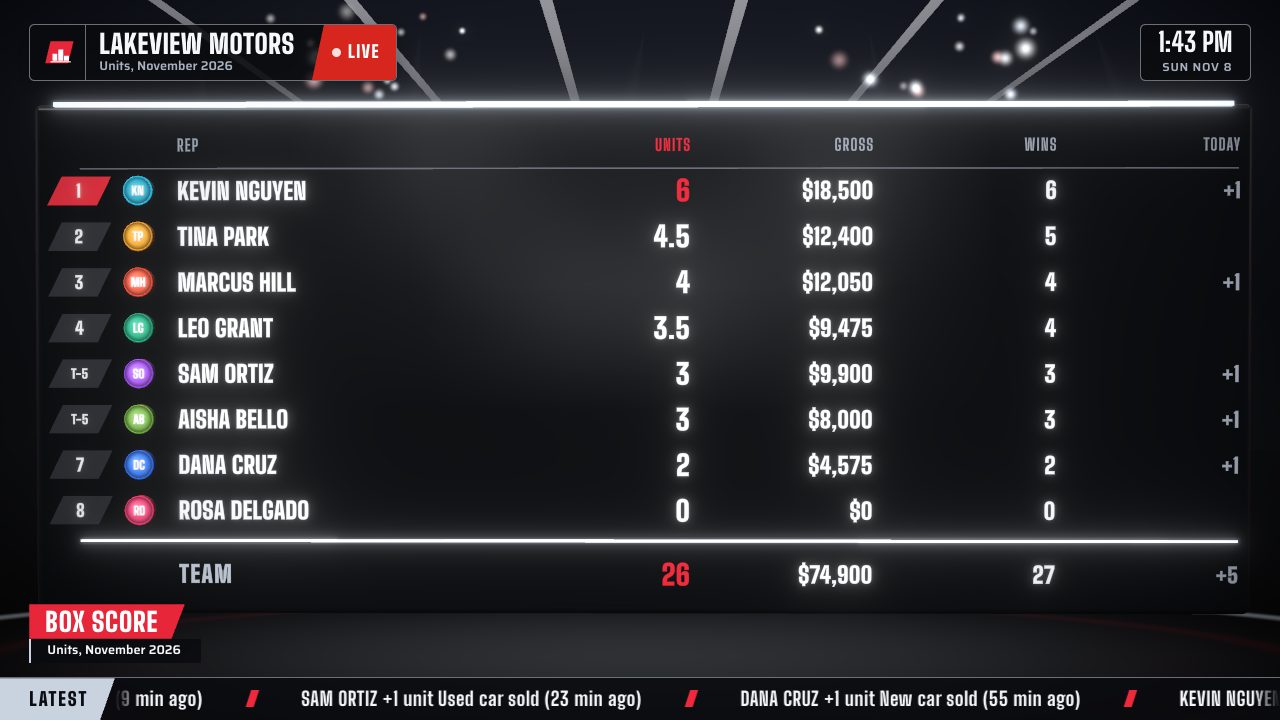
Every salesperson on the board, every scene including the box score and the Replay, every look and sound, and no GoalHorn mark.
Floor, $149 a month
Up to three boards for new, used and the sales office, or for more than one store, plus your own celebration sound and rotating between units and gross.
Want the box score for the month-end push? Start a free 14-day Team trial with a card, then $49/month unless you cancel.
Car sales tracker questions.
Is this car sales tracker free?
Yes. The Excel workbook and the CSV download straight from this page, with no sign-up and no email address.
How do I track car sales in Excel?
Log each delivery on one tab with the date, salesperson, stock number, New or Used, vehicle, units and gross. On a second tab, total each salesperson's units and gross for the month with SUMIFS, add a New criterion to split new from used, and rank them with COUNTIF. The template has all of it set up.
How do you count a split deal?
Give each salesperson a row of their own with 0.5 in Units and their share of the gross. Two halves make a unit, so the store's count stays right and both salespeople get credit.
What does tracking mean in car sales?
Where the month will finish at the current rate: units so far, divided by the days so far, times the days in the month. A store with 24 units through the 12th of a 31-day month is tracking 62. The template calls it Pace and colors it green when a salesperson is on track for their goal.
Should gross go on the sales board?
On a screen in the sales office, gross keeps the focus on profitable deals. On a showroom TV that customers can see, leave it off: in GoalHorn, pick None as the second number and the board shows units only.
Can one salesperson use it to track their own deals?
Yes. Put just your name on the Leaderboard tab, and the month's units, gross and pace become your own scorecard. Add a Commission column at the end of the deal log if your pay plan needs one; the totals don't change.
Can the tracker update a TV by itself?
Yes, through Google Sheets. Share the sheet by link and paste the link into GoalHorn: it reads the deal log every 30 seconds, ranks the salespeople and rings a bell for every new row. The desk adds rows at delivery, or Zapier or Make copies them from your CRM.
For what goes on the board itself, see the car sales board. For the goals to type into it, see how many cars a salesperson should sell a month, and for ways to use it, 20 car sales contest ideas.
Put the deal log on the TV.
Free for up to five salespeople. $49 a month flat for the whole store.